今回カンファレンスのハッキング用のWEBサーバにH2Oを選定しました。選定理由は色々ですが、主に検証です。
HTTP/2で使うのが本懐のようですが、カンファレンス用のサーバはローカルなので。
もくじ
H2Oってなにもの?
HTTP/2の課題と将来 from Kazuho Oku
インストール
必要なものをインストールします。
# yum groupinstall "Development Tools"

# yum install yum-utils

# yum install cmake libyaml-devel
リスタートが必要なプロセスを表示
# needs-restarting -s

systemd-logind.service
atd.service
NetworkManager.service
postfix.service
dbus.service
getty@tty1.service
serial-getty@ttyS0.service
systemd-journald.service
libstoragemgmt.service
リブートが必要なサービスを確認
# needs-restarting -r

Core libraries or services have been updated:
  openssl-libs -> 1:1.0.2k-8.el7
  glibc -> 2.17-196.el7
  glibc -> 2.17-196.el7
  linux-firmware -> 20170606-56.gitc990aae.el7
  gnutls -> 3.3.26-9.el7
  kernel -> 3.10.0-693.2.2.el7
  systemd -> 219-42.el7_4.1

Reboot is required to ensure that your system benefits from these updates.

More information:
https://access.redhat.com/solutions/27943
# reboot now
MariaDBのインストール
# yum install MariaDB-devel MariaDB-client MariaDB-server
# systemctl enable mysql
# systemctl start mysql
WordPress用データベースの作成
# mysql -u root

MariaDB [(none)]> CREATE DATABASE wpdb;
MariaDB [(none)]> GRANT ALL PRIVILEGES ON wpdb.* TO "wpdbuser"@"localhost" IDENTIFIED BY 'wpdbpassword';
MariaDB [(none)]> FLUSH PRIVILEGES;
MariaDB [(none)]> exit
Bye
WordPressのダウンロード
# cd /var/www/html/

# wget https://ja.wordpress.org/wordpress-4.8.2-ja.zip

# unzip wordpress-4.8.2-ja.zip

# mv wordpress wp

# cp /var/www/html/wp/wp-config-sample.php /var/www/html/wp/wp-config.php
コンフィグの設定
# vi /var/www/html/wp/wp-config.php

define('DB_NAME', 'wpdb');

/** MySQL データベースのユーザー名 */
define('DB_USER', 'wpdbuser');

/** MySQL データベースのパスワード */
define('DB_PASSWORD', 'wpdbpassword');
PHP7のインストール
# rpm -Uvh http://rpms.famillecollet.com/enterprise/remi-release-7.rpm
# yum install --enablerepo=remi-php71 php php-mysql php-mbstring
# vi /etc/php.ini

[Date]
; Defines the default timezone used by the date functions
; http://php.net/date.timezone
;date.timezone =
date.timezone = "Asia/Tokyo"
H2Oのインストール
# vi /etc/yum.repos.d/h2o.repo


[bintray-tatsushid-h2o-rpm]
name=bintray-tatsushid-h2o-rpm
baseurl=https://dl.bintray.com/tatsushid/h2o-rpm/centos/$releasever/$basearch/
gpgcheck=0
repo_gpgcheck=0
enabled=1
H2O設定
# cp /etc/h2o/h2o.conf /etc/h2o/h2o.conf.org
# vi /etc/h2o/h2o.conf

user: nobody
listen:
  port: 80
  host: 0.0.0.0

file.index: ['index.php', 'index.html']
file.send-gzip: ON
file.etag: OFF
expires: 1 day

hosts:
  "192.168.11.191":
    paths:
      /:
        file.dir: /var/www/html/wp/
        file.dirlisting: OFF

        # パーマリンク
        redirect:
          url: /index.php/
          internal: YES
          status: 307

        file.custom-handler:
         extension: .php
         fastcgi.connect:
          host: 127.0.0.1
          port: 9000
          type: tcp

access-log: /var/log/h2o/access.log
error-log: /var/log/h2o/error.log
pid-file: /var/run/h2o.pid

header.unset: "X-Powered-By"
header.set: "X-Content-Type-Options: nosniff"
とりあえず検証として動くように設定。
起動させます。
# systemctl enable h2o
# systemctl start h2o
# systemctl enable php-fpm
# systemctl start php-fpm
Firewalld設定
# systemctl enable firewalld
# systemctl start firewalld

# firewall-cmd --permanent --add-port=22/tcp --zone=public --permanent
# firewall-cmd --permanent --add-port=80/tcp --zone=public --permanent
# firewall-cmd --permanent --add-port=443/tcp --zone=public --permanent


# firewall-cmd --list-port --zone=public  --permanent
80/tcp 443/tcp 22/tcp


# firewall-cmd --reload
success
最低限必要なポートを開けます。
アクセスしてみよう
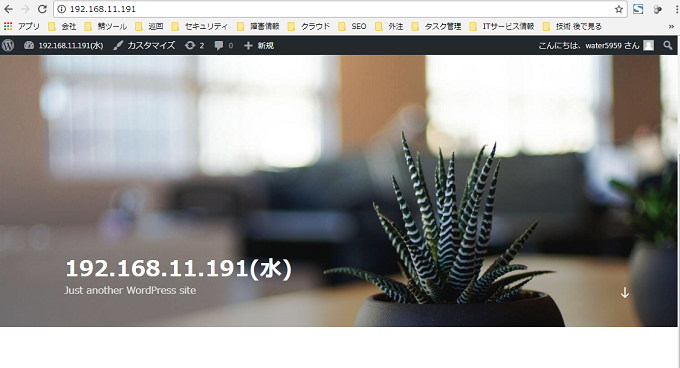
Hello H2O!
表示が出来ましたね。ここから色々脆弱性を混入させていく作業になるのですが、それは割愛。
ベンチマーク ab
カンファレンス用PCサーバ 2CPU5GB
# ab -n 1000 -c 100 http://192.168.11.191/

This is ApacheBench, Version 2.4 <$Revision: 655654 $>
Copyright 1996 Adam Twiss, Zeus Technology Ltd, http://www.zeustech.net/
Licensed to The Apache Software Foundation, http://www.apache.org/

Benchmarking 192.168.11.191 (be patient)
Completed 100 requests
Completed 200 requests
Completed 300 requests
Completed 400 requests
Completed 500 requests
Completed 600 requests
Completed 700 requests
Completed 800 requests
Completed 900 requests
Completed 1000 requests
Finished 1000 requests


Server Software:        h2o/2.2.2
Server Hostname:        192.168.11.191
Server Port:            80

Document Path:          /
Document Length:        12240 bytes

Concurrency Level:      100
Time taken for tests:   0.881 seconds
Complete requests:      1000
Failed requests:        0
Write errors:           0
Total transferred:      12496000 bytes
HTML transferred:       12240000 bytes
Requests per second:    1134.98 [#/sec] (mean)
Time per request:       88.107 [ms] (mean)
Time per request:       0.881 [ms] (mean, across all concurrent requests)
Transfer rate:          13850.32 [Kbytes/sec] received

Connection Times (ms)
              min  mean[+/-sd] median   max
Connect:        0    2   8.4      0      39
Processing:    10   82  18.4     84     125
Waiting:        3   79  17.3     83     117
Total:         41   84  14.7     84     125

Percentage of the requests served within a certain time (ms)
  50%     84
  66%     85
  75%     87
  80%     95
  90%    103
  95%    106
  98%    110
  99%    112
 100%    125 (longest request)
ConoHa 3CPU2GB
# ab -n 1000 -c 100 http://150.95.182.43/
This is ApacheBench, Version 2.3 <$Revision: 1430300 $>
Copyright 1996 Adam Twiss, Zeus Technology Ltd, http://www.zeustech.net/
Licensed to The Apache Software Foundation, http://www.apache.org/

Benchmarking 150.95.182.43 (be patient)
Completed 100 requests
Completed 200 requests
Completed 300 requests
Completed 400 requests
Completed 500 requests
Completed 600 requests
Completed 700 requests
Completed 800 requests
Completed 900 requests
Completed 1000 requests
Finished 1000 requests


Server Software:        h2o/2.2.2
Server Hostname:        150.95.182.43
Server Port:            80

Document Path:          /
Document Length:        51601 bytes

Concurrency Level:      100
Time taken for tests:   26.283 seconds
Complete requests:      1000
Failed requests:        0
Write errors:           0
Total transferred:      51863000 bytes
HTML transferred:       51601000 bytes
Requests per second:    38.05 [#/sec] (mean)
Time per request:       2628.317 [ms] (mean)
Time per request:       26.283 [ms] (mean, across all concurrent requests)
Transfer rate:          1926.99 [Kbytes/sec] received

Connection Times (ms)
              min  mean[+/-sd] median   max
Connect:        0    1   2.5      0      10
Processing:   107 2542 356.6   2543    3580
Waiting:       93 2506 356.4   2511    3539
Total:        107 2543 355.8   2543    3590

Percentage of the requests served within a certain time (ms)
  50%   2543
  66%   2598
  75%   2667
  80%   2728
  90%   2870
  95%   3027
  98%   3215
  99%   3459
 100%   3590 (longest request)
H2O, PHP-FPM, MariaDB, システム面がデフォルト設定なので、チューニングすれば全然違う結果になるかもしれません。
また、今回は講義形式だったので、サーバにアクセスして攻撃して頂いたのは僅かでしたが、H2Oを実際に使うことで動作や負荷を与えた場合の検証が出来たので良かったです。
関連記事 - More from my site -
 PHPエラーまとめ
 しめじとアボガドの和風めんつゆスパゲティ
 Laravel Redisへの保存
 Monit CentOS7 Apache, MySQL
 CentOS7 tuned
- Cisco ACL
 10^nの世界 Powers of Ten with Japanese translation
 AWS CLI AWS S3にアップロード
 Golang 分散トランザクション
 AD参加ローカルユーザに、プリントサーバのプリンター使用許可 GPO設定
 【Nginx Error】 open() “/var/lib/nginx/tmp/fastcgi/6/08/0000000086” failed (13: Permission denied) while reading upstream, client
 SSH ログイン通知メール
 EC2からRDSに接続する MySQL, PostgreSQL
- Golang Collectionをキーから、値やオブジェクトをMapにキャッシュ