プロトタイプを作りました。
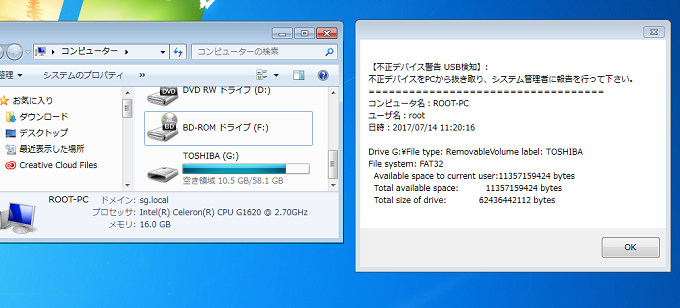
USBなどメディアを検知してメールを送るというもの。
※今後機能や制御を拡張
OKでた。
技術顧問が機能拡張、モダンにデザインして仕上げてくれる模様٩(๑❛ᴗ❛๑ )
Form1.cs
using System;
using System.Threading.Tasks;
using System.Windows.Forms;
using System.IO;
//using System.Collections.Generic;
//using System.ComponentModel;
//using System.Data;
//using System.Drawing;
//using System.Linq;
//using System.Text;

namespace detectUsbFormApp
{
    public partial class Form1 : Form
    {
        public Form1()
        {
            InitializeComponent();

            //USB検知実行するよ! =========================================================
            //* 管理者にメールを送ります。
            //* 一度管理者にメール通知した後はUSBを抜くまでアラートが発生。
            var task = Task.Run(() =>
            {
                while (true)
                {
                    detectUSB();
                    System.Threading.Thread.Sleep(30000); // 30秒スリープ
                }

            });
            //USB検知実行するよ! ここまで =================================================
        }


        private void Form1_Load(object sender, EventArgs e)
        {

        }

        // 現在の環境情報を取得
        public static string GetLocalMachineEnvironment()
        {
            string ret;

            ret = "コンピュータ名:" + Environment.MachineName + "\r\n"
                    + "ユーザ名:" + Environment.UserName + "\r\n"
                    + "日時:" + System.DateTime.Now + "\r\n";

            return ret;
        }


        //==========================================================================
        // USB検知機能
        //==========================================================================
        public static void detectUSB()
        {

            DriveInfo[] allDrives = DriveInfo.GetDrives(); // ドライブ情報取得

            foreach (DriveInfo d in allDrives)
            {

                //USB(Romovableディスク), CD/DVDを検知した場合
                if (d.DriveType == DriveType.Removable || d.DriveType == DriveType.CDRom)
                {
                    //Console.WriteLine("WARNING!! 不正デバイス検知!!!");
                    string userInfo = GetLocalMachineEnvironment();


                    // USBドライブが待機状態の場合
                    if (d.IsReady == true)
                    {
                        string results;
                        string name                   = d.Name;
                        System.IO.DriveType driveType = d.DriveType;
                        string volumeLabel            = d.VolumeLabel;
                        string driveformat            = d.DriveFormat;
                        long avalableFreeSpace        = d.AvailableFreeSpace;
                        long TotalFreeSpace           = d.TotalFreeSpace;
                        long TotalSize                = d.TotalSize;


                        results  = $"Drive {name}";
                        results += $"File type: {driveType}";
                        results += $"Volume label: {volumeLabel} \r\n";
                        results += $"File system: {driveformat} \r\n";
                        results += $"  Available space to current user:{avalableFreeSpace} bytes \r\n";
                        results += $"  Total available space:          {TotalFreeSpace} bytes \r\n";
                        results += $"  Total size of drive:            {TotalSize} bytes \r\n";


                        //===================================================================
                        // アラートメール送信 Gmailサーバを使用
                        //===================================================================
                        string id        = "exampleuser@gmail.com";  //GmailID ※アドレス
                        string pass      = "xxxxxxxxxxxxxxxxxx";      // Gmailパスワード
                        string fromEMail = "exampleuser@gmail.com";  //From
                        string toEMail   = "admin@example.com";   //警告通知 宛先アドレス
                        string subject;                                //タイトル
                        string body;                                   //本文

                        subject = "【要 緊急対応】不正デバイス検知アラート";
                        body    = $"【不正デバイス警告 USB検知】:          \r\n" +
                                  "不正デバイスをPCから抜き取り、システム管理者に報告を行って下さい。 \r\n" +
                                  "===================================  \r\n" +
                                  $"{userInfo}                          \r\n" +
                                  $"{results}";


                        System.Net.Mail.SmtpClient smtp = new System.Net.Mail.SmtpClient();
                        smtp.Host = "smtp.gmail.com"; //SMTPサーバ
                        smtp.Port = 587; //SMTPポート
                        smtp.Credentials = new System.Net.NetworkCredential(id, pass); //認証
                        smtp.EnableSsl = true; //SSL
                        System.Net.Mail.MailMessage oMsg = new System.Net.Mail.MailMessage(fromEMail, toEMail, subject, body);
                        smtp.Send(oMsg); //メール送信
                        // メール送信 ここまで ================================================


                        //ユーザのモニターに警告を表示させ、システム管理者への報告を促す
                        MessageBox.Show(body);
                    }


                }// end if (d.DriveType == DriveType.Removable || d.DriveType == DriveType.CDRom)


            } // foreach


        } // detectUSB()
        // USB検知機能 ここまで ======================================================================


        // 終了ボタンのクリック アプリケーションの終了  ※フォーム表示フラグが1の時のみ可能
        private void 終了ToolStripMenuItem_Click(object sender, EventArgs e)
        {
            notifyIcon1.Visible = false;
            Application.Exit();
        }


    }// class Form1

}// namespace detectUsbFormApp
Program.cs
using System;
using System.Collections.Generic;
using System.Linq;
using System.Threading.Tasks;
using System.Windows.Forms;

namespace detectUsbFormApp
{
    static class Program
    {
        /// <summary>
        /// アプリケーションのメイン エントリ ポイントです。
        /// </summary>
        [STAThread]
        static void Main()
        {
            Application.EnableVisualStyles();
            Application.SetCompatibleTextRenderingDefault(false);


            //==========================================
            // フォーム表示制御 デフォルトは非表示
            //==========================================
            //フラグ 0 = 非表示, 1 = 表示
            int showFlag = 0;

            if (showFlag == 1)
            {
                Application.Run(new Form1());
            }
            else if(showFlag == 0)
            {
                //非表示にする場合
                Form1 form = new Form1();
                form.Hide();
                Application.Run();
            }
            // 表示制御 ここまで =======================
        }
    }
}
関連記事 - More from my site -
 Laravel ジョブ 失敗時の挙動
 Apache ProxyPass フレームワーク公開用内部リダイレクト
 PHP 配列から重複を除外しキーを詰める
- 【工事中】Laravel l5-repositoryでリポジトリに統一性を持たせる
 RTX1200 VPNパススルー設定 PPTP IPsec
- Laravel 論理削除を戻す、物理削除
 プロセス当たりのメモリを知る
 単体テスト
単体テスト Vue.js お勉強だよ
- Laravelお役立ちリンク集
 ロードアベレージについての所感
 Fluentd エージェントからAggregatorにApacheログをシンプルに出力
 Asterisk MySQLメモ
 No ‘Access-Control-Allow-Origin’ header is present on the requested resource エラー