GitHubでPersonal Access Tokenを発行します
https://docs.github.com/ja/authentication/keeping-your-account-and-data-secure/managing-your-personal-access-tokens
SourceTree設定
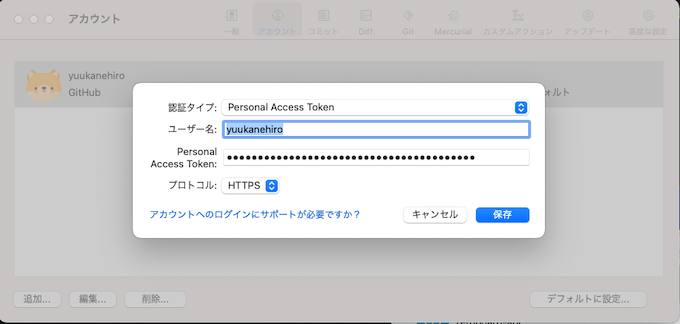
アカウント設定からユーザ名、Personal Access Tokenを設定してください。
Terminal
$ vi ~/.gitconfig


[core]
        excludesfile = /Users/{ユーザ名}/.gitignore_global
[difftool "sourcetree"]
        cmd = opendiff \"$LOCAL\" \"$REMOTE\"
        path =
[mergetool "sourcetree"]
        cmd = /Applications/Sourcetree.app/Contents/Resources/opendiff-w.sh \"$LOCAL\" \"$REMOTE\" -ancestor \"$BASE\" -merge \"$MERGED\"
        trustExitCode = true
[user]
        name = {ユーザ名}
        email = yuu@example.com
[filter "lfs"]
        process = git-lfs filter-process
        required = true
        clean = git-lfs clean -- %f
        smudge = git-lfs smudge -- %f
[commit]
        template = /Users/{ユーザ名}/.stCommitMsg
[credential]
        helper = manager

[url "https://ghp_CH4 (略) jid:x-oauth-basic@github.com/"]
        insteadOf = https://github.com/
MacのTerminalに設定します。ユーザ名と(略)としているPersonal Access Tokenは各自の値を入力します。 これでSource TreeからGitHubのリポジトリをFetchしたり、Pushできるようになります。
関連記事 - More from my site -
 GitHubのメールアドレスを匿名設定
- [Solved] Git Pushでエラー | error: RPC failed; HTTP 400 curl 22 The requested URL returned error: 400 send-pack: unexpected disconnect while reading sideband packet Writing objects: 100% (9/9), 2.30 MiB | 4.19 MiB/s, done. Total 9 (delta 5), reused 0 (delta 0), pack-reused 0 fatal: the remote end hung up unexpectedly
 GitHub 鍵ありのリポジトリに接続
 GitHub 草が生えない
 Git GitHub 過去に戻りたいんだが…?
 Puttyで作成したSSH鍵でGitHubにPushする
 AWS Centos7 Laravelインストール
 PHP カプセル化
 メールサーバがブラックリストに載る理由
 Mac JMeter(工事中)
- could not write lock file “xxx.pid”: No space left on device
 リーンスタートアップ
 AWS GuardDuty+Chatbot+Slackで通知
 テストコードを書くべき箇所