
もくじ
関連
- GCP CLI設定 CloudFunctions+BigQuery+CloudRun+ESPv2+独自ドメイン①
- GCP BigQueryの作成 CloudFunctions+BigQuery+CloudRun+ESPv2+独自ドメイン②
- GCP CloudFunction 関数の作成 CloudFunctions+BigQuery+CloudRun+ESPv2+独自ドメイン③
- GCP CloudRun + ESPv2によるAPI Gatewayリバースプロキシの作成④ CloudFunctions+BigQuery+CloudRun+ESPv2+独自ドメイン
完成図
クライアント <-> Route53 ... 名前解決
クライアント → CloudRun(API GatewayとしてのプロキシDockerコンテナ「ESPv2」を動かすコンテナを動作させる基盤) -> CloudFunctions
おおまかな作業概要
- プロキシサーバとなるコンテナイメージを作成
- CloudRunにコンテナイメージをデプロイ
- ドメインマッピングによって独自ドメインに対応し無料HTTPS証明書を仕込む
目的
- 独自ドメインとCloudFunctionsを結びつける
GCPから動的にURLで作成されたものをもしアプリに埋め込んでしまうと、リソースを万が一誤って削除した場合に、URLの再現性ができないので。削除してしまったリソースURLを利用していたバージョンのアプリが死んでしまう🐱 💦
変数定義
REGION=asia-northeast1
PROJECT_ID=test-cloud-functions-20211208
FUNCTIONS_NAME= storeLoginHistory
CLOUD_RUN_SERVICE_NAME=api-gateway
リージョン設定
$ gcloud config set run/region $REGION
APIを有効化させておく
$ gcloud services enable servicemanagement.googleapis.com
$ gcloud services enable servicecontrol.googleapis.com
$ gcloud services enable endpoints.googleapis.com
# Helloプログラムをデプロイ
$ export CLOUD_RUN_SERVICE_NAME=api-gateway
$ export PROJECT_ID=test-cloud-functions-20211208
$ gcloud run deploy $CLOUD_RUN_SERVICE_NAME \
    --image="gcr.io/cloudrun/hello" \
    --allow-unauthenticated \
    --platform managed \
    --project=$PROJECT_ID


    Deploying container to Cloud Run service [api-gateway] in project [test-cloud-functions-20211208] region [asia-northeast1]
✓ Deploying new service... Done.
  ✓ Creating Revision... Revision deployment finished. Waiting for health check to begin.
  ✓ Routing traffic...
  ✓ Setting IAM Policy...
Done.
Service [api-gateway] revision [api-gateway-00001-peh] has been deployed and is serving 100 percent of traffic.
Service URL: https://api-gateway-dsbamy37za-an.a.run.app
Service URLの「api-gateway-dsbamy37za-an.a.run.app」がCloudRunをデプロイする先になるので変数に入れます。
変数定義
CLOUD_RUN_HOSTNAME=api-gateway-dsbamy37za-an.a.run.app
gcp-test-kanehiro.sample-dev.work.yaml
swagger: '2.0'
info:
  title: sample Cloud Endpoints + GCF
  description: :-)
  version: 1.0.0
host: api-gateway-dsbamy37za-an.a.run.app ●🐱 ここ!
schemes:
  - https
produces:
  - application/json
paths:
  /api/v1/storeLoginHistory: ●🐱 ここ!
    post:
      summary: store Login History
      operationId: storeLoginHistory
      x-google-backend:
        address: https://asia-northeast1-test-cloud-functions-20211208.cloudfunctions.net/storeLoginHistory ●🐱 ここ!
      responses:
        '200':
          description: A successful response
実際のもの
swagger: '2.0'
info:
  title: sample Cloud Endpoints + GCF
  description: :-)
  version: 1.0.0
host: api-gateway-dsbamy37za-an.a.run.app
schemes:
  - https
produces:
  - application/json
paths:
  /api/v1/storeLoginHistory:
    post:
      summary: store Login History
      operationId: storeLoginHistory
      x-google-backend:
        address: https://asia-northeast1-test-cloud-functions-20211208.cloudfunctions.net/storeLoginHistory ●🐱 ここ!
      responses:
        '200':
          description: A successful response
$ gcloud config set project $PROJECT_ID
$ gcloud endpoints services deploy gcp-test-kanehiro.sample-dev.work.yaml \
    --project $PROJECT_ID


Waiting for async operation operations/services.api-gateway-dsbamy37za-an.a.run.app-0 to complete...
Waiting for async operation operations/serviceConfigs.api-gateway-dsbamy37za-an.a.run.app:a0c98aa8-5a8a-4837-aa35-f8227b70823b to complete...
Operation finished successfully. The following command can describe the Operation details:
 gcloud endpoints operations describe operations/serviceConfigs.api-gateway-dsbamy37za-an.a.run.app:a0c98aa8-5a8a-4837-aa35-f8227b70823b

Waiting for async operation operations/rollouts.api-gateway-dsbamy37za-an.a.run.app:2796de89-4484-4a1e-9580-8acc410de389 to complete...
Operation finished successfully. The following command can describe the Operation details:
 gcloud endpoints operations describe operations/rollouts.api-gateway-dsbamy37za-an.a.run.app:2796de89-4484-4a1e-9580-8acc410de389

Enabling service [api-gateway-dsbamy37za-an.a.run.app] on project [test-cloud-functions-20211208]...
Operation "operations/acf.p2-904657856192-25941cc1-94f1-4ad3-bbe9-cdbb6dcc00c4" finished successfully.


Service Configuration [2021-12-09r0] uploaded for service [api-gateway-dsbamy37za-an.a.run.app] ●🐱 ここ

To manage your API, go to: https://console.cloud.google.com/endpoints/api/api-gateway-dsbamy37za-an.a.run.app/overview?project=test-cloud-functions-20211208
Service Configuration [2021-12-09r0]
[]の中の値が重要
変数定義
CONFIG_ID=2021-12-09r0
サービスの有効化
gcloud services enable servicemanagement.googleapis.com
gcloud services enable servicecontrol.googleapis.com
gcloud services enable endpoints.googleapis.com
gcloud services enable $CLOUD_RUN_HOSTNAME
ドメインの検証
$ gcloud domains verify gcp-test-kanehiro.sample-dev.work
CNAMEを利用して検証すると良いかと思います
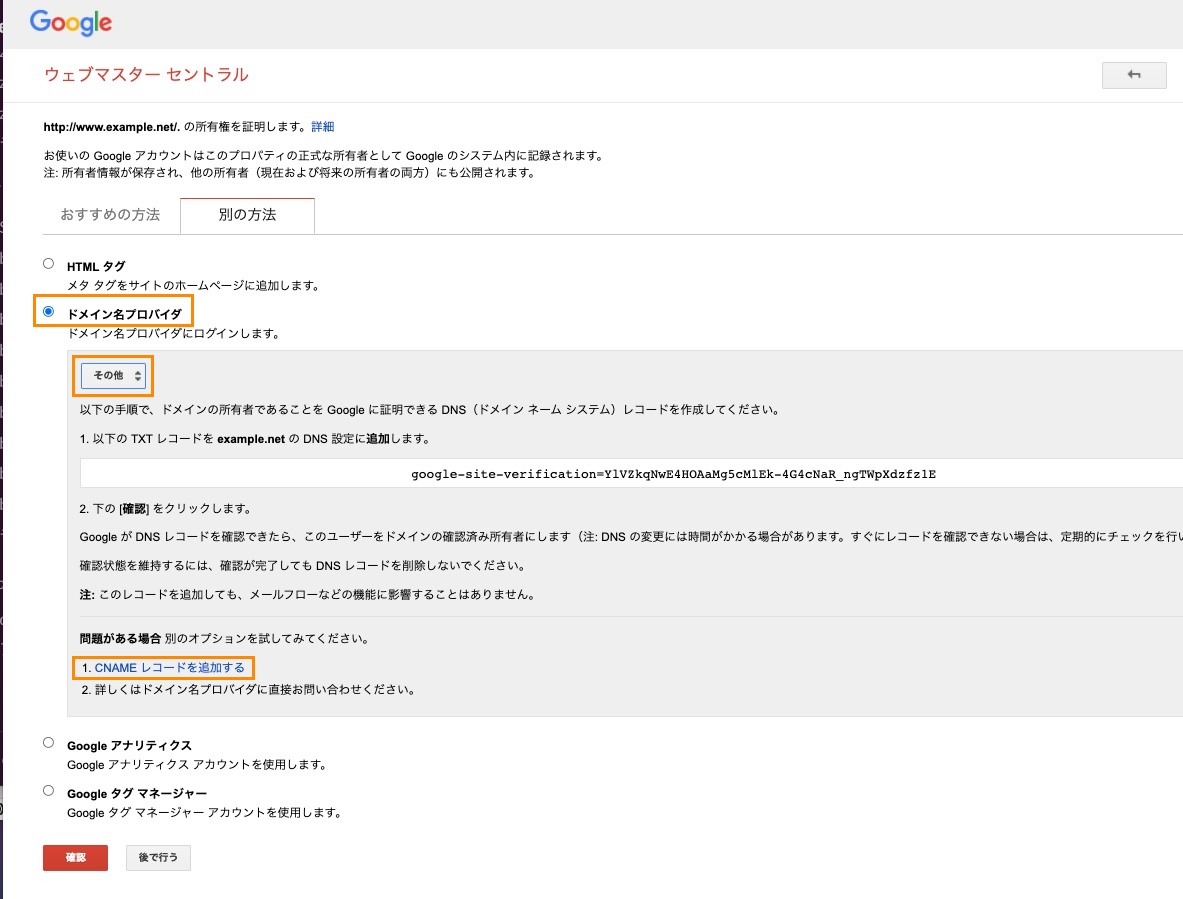
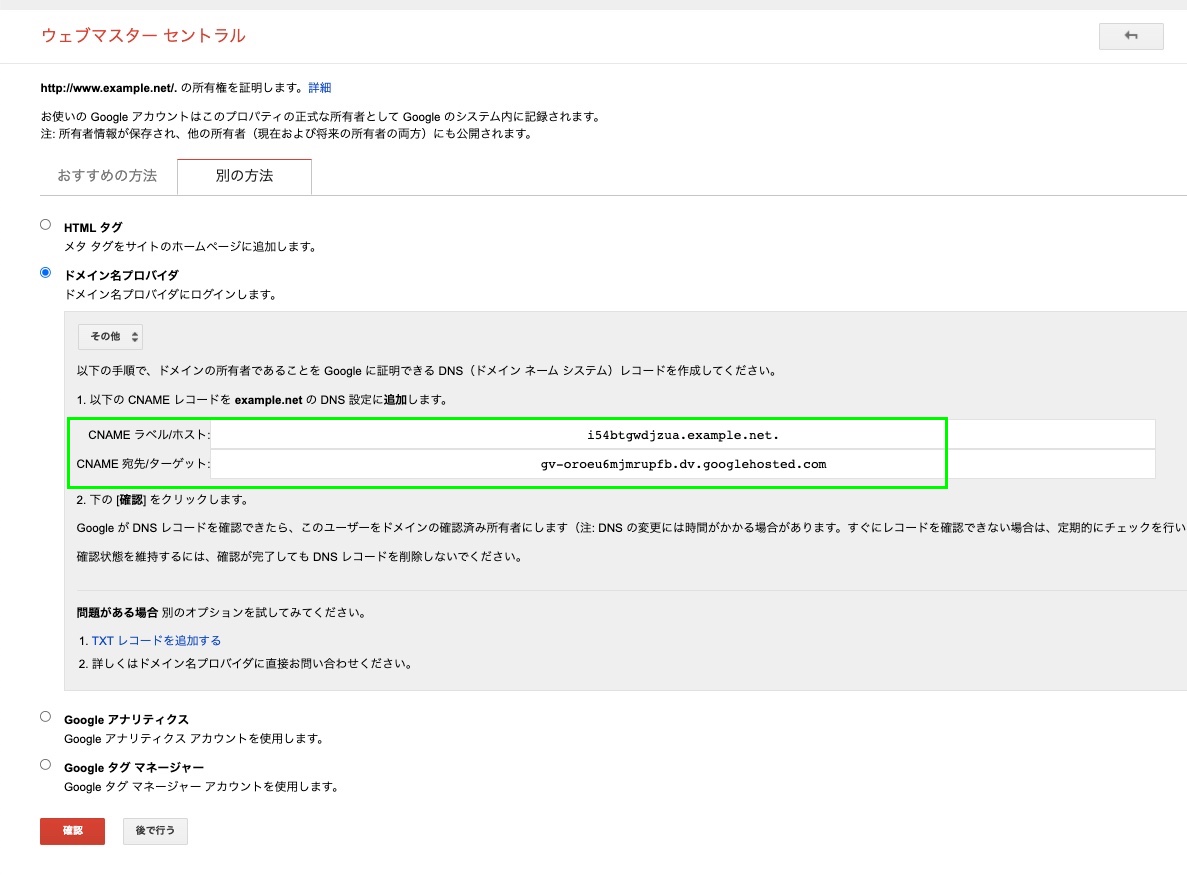
緑の値をDNSサーバに設定し、下記のサイトで反映されたか確認をクリックします。
問題がなければ確認を押して認証を終えます。
ESPv2を動かす
$ git clone https://github.com/GoogleCloudPlatform/esp-v2.git
$ chmod +x ./esp-v2/docker/serverless/gcloud_build_image

Dockerイメージの作成
$ ./esp-v2/docker/serverless/gcloud_build_image -s $CLOUD_RUN_HOSTNAME \
    -c $CONFIG_ID -p $PROJECT_ID

・・・

0d989395d9d2: Mounted from endpoints-release/endpoints-runtime-serverless
12a2f0c9291b: Mounted from endpoints-release/endpoints-runtime-serverless
e2eb06d8af82: Layer already exists
c93571ebdeb4: Mounted from endpoints-release/endpoints-runtime-serverless
2.32.0-api-gateway-dsbamy37za-an.a.run.app-2021-12-09r0: digest: sha256:b650aeedaec4acc7d857b0f424356655a47c4eb01916551550caa75cd6db6a38 size: 3680
DONE
------------------------------------------------------------------------------------------------------------------------------------------------
ID                                    CREATE_TIME                DURATION  SOURCE                                                                                                       IMAGES                                                                                                                     STATUS
23b03b17-9f1e-4bb9-93f4-33e9d3a14d3f  2021-12-09T10:31:17+00:00  38S
gs://test-cloud-functions-20211208_cloudbuild/source/1639045874.289586-ae21ef3d28dc4aa8a42c50994867148b.tgz  gcr.io/test-cloud-functions-20211208/endpoints-runtime-serverless:2.32.0-api-gateway-dsbamy37za-an.a.run.app-2021-12-09r0  SUCCESS
gcr.io/test-cloud-functions-20211208/endpoints-runtime-serverless:2.32.0-api-gateway-dsbamy37za-an.a.run.app-2021-12-09r0 SUCCESS
serverless:2.32.0
変数定義
ESP_VERSION=2.32.0
ESPv2イメージのコンテナをCloudRunにデプロイ
$ gcloud run deploy ${CLOUD_RUN_SERVICE_NAME} \
  --image="gcr.io/${PROJECT_ID}/endpoints-runtime-serverless:${ESP_VERSION}-${CLOUD_RUN_HOSTNAME}-${CONFIG_ID}" \
  --allow-unauthenticated \
  --platform managed \
  --project=${PROJECT_ID}

Deploying container to Cloud Run service [api-gateway] in project [test-cloud-functions-20211208] region [asia-northeast1]
✓ Deploying... Done.
  ✓ Creating Revision...
  ✓ Routing traffic...
  ✓ Setting IAM Policy...
Done.
Service [api-gateway] revision [api-gateway-00003-fen] has been deployed and is serving 100 percent of traffic.
Service URL: https://api-gateway-dsbamy37za-an.a.run.app
- POST
- https://api-gateway-dsbamy37za-an.a.run.app/api/v1/storeLoginHistory
{
    "message": "hoge",
    "user_id": 1000,
    "anonymous_token": "tokendayo2",
    "login_type": "Normal"
}
動いた!
デプロイを確認できたぞい
証明書の取得とマッピング
 % gcloud beta run domain-mappings create --service apps-gcp \
   --domain gcp-test-kanehiro.sample-dev.work \
   --platform=managed --region=asia-northeast1


You do not currently have this command group installed.  Using it
requires the installation of components: [beta]


Your current Cloud SDK version is: 366.0.0
Installing components from version: 366.0.0

┌─────────────────────────────────────────────┐
│     These components will be installed.     │
├──────────────────────┬────────────┬─────────┤
│         Name         │  Version   │   Size  │
├──────────────────────┼────────────┼─────────┤
│ gcloud Beta Commands │ 2021.12.03 │ < 1 MiB │
└──────────────────────┴────────────┴─────────┘

For the latest full release notes, please visit:
  https://cloud.google.com/sdk/release_notes

Do you want to continue (Y/n)?  Y
$ gcloud beta run domain-mappings create --service $CLOUD_RUN_SERVICE_NAME \
  --domain gcp-test-kanehiro.sample-dev.work \
  --platform=managed \
  --region=$REGION


  Creating......done.
Waiting for certificate provisioning. You must configure your DNS records for certificate issuance to begin.
NAME         RECORD TYPE  CONTENTS
api-gateway  A            216.239.32.21
api-gateway  A            216.239.34.21
api-gateway  A            216.239.36.21
api-gateway  A            216.239.38.21
api-gateway  AAAA         2001:4860:4802:32::15
api-gateway  AAAA         2001:4860:4802:34::15
api-gateway  AAAA         2001:4860:4802:36::15
api-gateway  AAAA         2001:4860:4802:38::1
10分ぐらい待ちます。
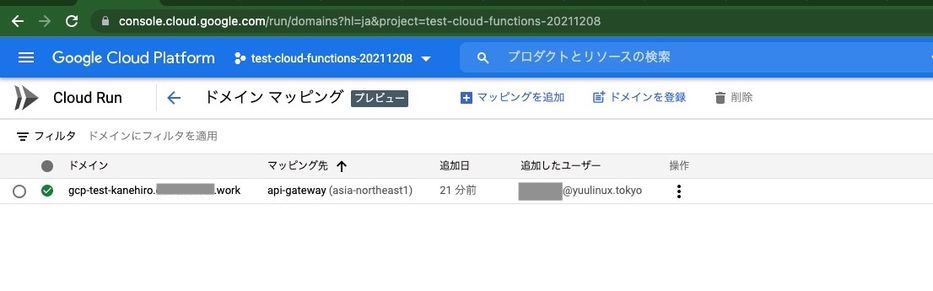
POSTMANで確認する
- POST
- https://gcp-test-kanehiro.sample-dev.work/api/v1/storeLoginHistory
{
    "message": "hoge",
    "user_id": 1001,
    "anonymous_token": "tokendayo3",
    "login_type": "CustomDomain"
}
できた😸
関連記事 - More from my site -
 レンタルサーバ比較
 Laravel6 AWS SES連携 + Bounce, Complaint対応 その③
 SQL Server On Linuxのお勉強
 ドモルガンでSQLリファクタ
 Windows ファイル自動削除 FORFILES
 【Git】git reflog ローカルの変更履歴を確認し、過去に戻る
 障害報告書 テンプレv1
 PHP グローバル変数とスコープ
![[DDD] Value Object 値オブジェクト](https://www.yuulinux.tokyo/contents/wp-content/uploads/2020/01/PHP-logo_2-150x150.jpeg) [DDD] Value Object 値オブジェクト
[DDD] Value Object 値オブジェクト SASL認証 コマンドでのログイン確認
 【非公開】業種特化型ポータル
- RTX1000 DHCP設定
 Laravel Tinker+ Sourcetreeを利用したデバッグ
 IBM BlueMix Infrastructure(旧SoftLayer) KVMコンソール接続設定